



 2026-09-15
 91
91 Interactive whiteboards and interactive flat panel displays (IFPD) are used in classrooms, meeting rooms and collaborative spaces where large screens must remain readable under ceiling lights, windows and changing ambient conditions. The cover glass affects not only glare, but also image sharpness, stylus feel, touch response, durability and the overall viewing experience.
AG anti-glare glass reduces disturbing reflections by diffusing reflected light at the surface. However, the best AG glass is not simply the glass with the highest haze or the lowest gloss. For 4K IFPD, the correct specification must balance glare reduction with text clarity, low sparkle, writing feel and large-area uniformity.
Custom Spray Coated AG Cover Glass for Interactive Flat Panel Displays

Interactive whiteboard in a bright classroom environment where AG cover glass helps control ambient reflections.
AG glass is cover glass with a controlled micro-textured surface or anti-glare layer that reduces mirror-like reflections. For interactive whiteboards, the main engineering challenge is to reduce glare without making fine text, icons, diagrams and handwriting look soft or grainy.
This is especially important on large 4K classroom and conference displays because users view the screen from different angles and often interact with it using fingers or a stylus.
Haze describes how strongly light is diffused through the optical system. There is no universal best haze value for every interactive whiteboard.
Haze Direction | Benefit | Trade-Off |
Lower Haze | Better fine-detail clarity and less milky appearance | May provide weaker glare suppression in bright rooms |
Medium Haze | Balanced glare control and text clarity for many classroom / meeting-room applications | Must still be checked for sparkle on 4K panels |
Higher Haze | Stronger glare diffusion | Can soften fine text, reduce perceived contrast or increase grain / sparkle |
Gloss describes the strength of mirror-like surface reflection, while haze describes light diffusion through the optical path. These parameters are related but not interchangeable.
A lower-gloss surface generally looks more matte and can reduce visible reflected light sources, but gloss should be specified together with haze and image clarity rather than used as a standalone target.
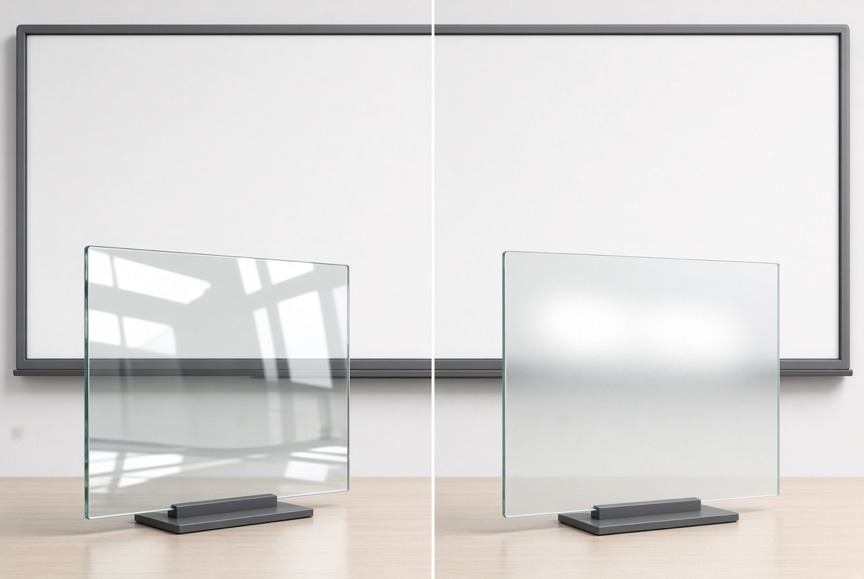
Ordinary clear glass and AG anti-glare glass can produce visibly different reflection behavior under the same ambient light.
Sparkle is a grain-like visual artifact caused by interaction between the AG surface microstructure and the display pixel structure. It can be especially noticeable on high-resolution 4K interactive panels, fine text and white backgrounds.
For 4K interactive whiteboards, haze alone is not enough. Low-sparkle performance should also be evaluated with the actual display panel.
l Check white backgrounds, fine black text and thin annotation lines.
l View the display at normal classroom / meeting-room distance and at oblique angles.
l Compare multiple AG samples with similar haze but different microstructure.
l Use the actual panel resolution and pixel pitch when approving the surface.
Interactive whiteboards are writing surfaces as well as displays. Surface texture affects finger glide, stylus drag and perceived paper-like feel.
Too Smooth: May preserve clarity but can leave stronger mirror-like reflections.
Too Rough: Can increase stylus drag, grain appearance or sparkle.
Balanced Texture: Provides practical glare reduction while maintaining comfortable writing and touch interaction.
High transmittance is desirable, but the highest possible transmittance does not automatically produce the best interactive display. In a bright classroom, a surface with excellent transmission but poor glare control can still appear less readable than a carefully balanced AG surface.
Evaluate transmittance together with haze, surface reflectance, glass thickness, display brightness and the complete optical stack.
AG Glass Selection by Use Environment
Use Environment | AG Selection Priority |
Bright Classroom | Stronger glare control; verify text clarity and sparkle |
4K Education Display | Low sparkle + fine-text clarity |
Conference Room | Balanced haze, gloss and natural image appearance |
Stylus-Heavy Whiteboard | Surface roughness + comfortable writing feel |
Window-Facing Screen | Higher priority on ambient-light suppression |
Long Viewing Sessions | Comfortable matte appearance without excessive haze |
Interactive-whiteboard projects can use different AG processes. The correct choice depends on optical targets, durability, cost, panel size and production method.
Item | Etched AG | Spray-Coated AG |
AG Mechanism | Microstructure formed directly in the glass surface | Anti-glare layer deposited on the surface |
Parameter Tuning | Controlled by etching process | Flexible adjustment through coating formulation / process |
Surface Durability | AG texture is integral to the glass surface | Depends on coating formulation and adhesion |
Large-Panel Economics | Depends on available etching capacity | Often attractive for large-format, cost-sensitive production |
Best Fit | Durability-focused projects | Flexible / cost-sensitive IFPD projects |
Important: AG treatment primarily addresses glare. If fingerprint resistance and easier cleaning are also required, consider a compatible AF oleophobic treatment rather than assuming AG alone provides anti-fingerprint performance.
Glass thickness should be selected from panel size, mounting structure, impact requirement, touch technology and weight target. Large interactive displays may use several millimeters of cover glass, but a single universal thickness is not appropriate for every IFPD.
l Thinner glass can reduce weight and may help capacitive-touch performance, but mechanical margin must be reviewed.
l Thicker glass can improve rigidity and impact margin but increases weight and may affect touch-stack design.
l Thermal tempering or chemical strengthening should be selected according to glass material, thickness and safety requirements.
Touch System | What to Check |
IR Touch | Review edge design, frame geometry, glass flatness and optical path. |
PCAP | Review total glass thickness, dielectric stack, bonding and touch-controller tuning. |
Stylus / EM / Hybrid | Review surface roughness, friction, writing feel and any optical sparkle. |
Interactive whiteboards commonly use large-format cover glass. As size increases, uniformity and mechanical handling become more important than simply reproducing a small-panel AG specification.
Flatness: Large panels must stay sufficiently flat for framing, bonding and optical consistency.
Tempering Distortion: Heat treatment can introduce roller-wave or shape distortion that should be controlled.
Haze Uniformity: Center-to-edge AG consistency matters across the full viewing area.
Gloss Uniformity: Large visible changes in matte appearance can be distracting.
Sparkle Uniformity: 4K panels should be checked across multiple screen zones.
Edge Quality: Large glass requires controlled edge finishing to reduce chipping during handling and assembly.
Transport & Assembly: Packaging, lifting and frame tolerance should be considered in the glass design.
Never approve AG glass based on haze alone. A complete engineering request should include the following items.
Specification | What to Define |
Haze | Target or acceptable range based on the actual display and lighting environment |
Gloss | Target matte appearance / reflected-light behavior |
Sparkle | Low-sparkle requirement for 4K or high-resolution IFPD |
Surface Roughness | Ra or approved tactile reference sample |
Transmittance | Evaluate together with haze and complete stack |
Glass Thickness | Selected from size, strength, touch and weight |
Flatness | Especially important for large panels |
Strengthening | Thermal tempering or chemical strengthening |
AG Process | Etched, spray-coated or other approved method |
Touch / Stylus Compatibility | Test with the actual touch module |
Cleaning Resistance | Confirm against expected cleaners and repeated wiping |
Sample Approval | Evaluate on the actual display before mass production |
l 1. Identify the use environment: classroom, meeting room, window-facing or controlled lighting.
l 2. Confirm the display resolution, pixel pitch and viewing distance.
l 3. Choose preliminary haze / gloss directions rather than one fixed number.
l 4. Review sparkle and fine-text clarity on the actual panel.
l 5. Evaluate writing feel and touch compatibility.
l 6. Confirm glass thickness, strength, flatness and edge requirements.
l 7. Compare etched and spray-coated AG if both are commercially viable.
l 8. Approve representative samples before locking the production specification.
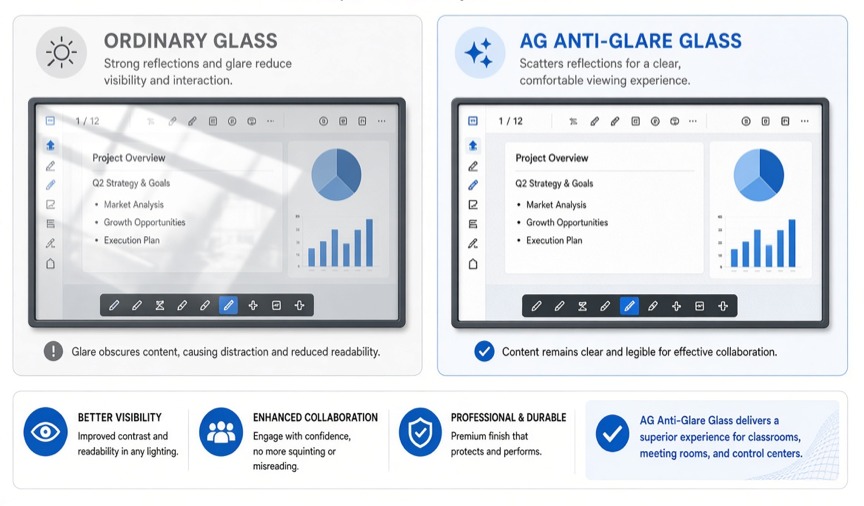
Large interactive learning display: final AG selection should be validated on the real 4K panel and touch system.
There is no universal best haze value. Lower haze preserves fine-detail clarity, while higher haze provides stronger glare diffusion. The correct level should be selected with the actual display resolution, room lighting and viewing distance.
Haze describes how strongly light is diffused through the optical system, while gloss describes how strongly the surface produces mirror-like reflections. Both should be specified because one value cannot fully describe AG appearance.
Sparkle is a grain-like visual artifact caused by interaction between the AG microstructure and the display pixel structure. It can be more noticeable on 4K and other high-resolution panels.
Low sparkle helps preserve fine text, white backgrounds, diagrams and handwriting on high-resolution displays. For 4K IFPD, sparkle should be evaluated together with haze and gloss.
Yes. Surface roughness affects stylus drag and writing feel. A balanced AG texture should reduce glare without becoming excessively rough or creating uncomfortable writing resistance.
Neither process is universally better. Etched AG offers an integral glass microstructure, while spray-coated AG can provide flexible parameter adjustment and attractive economics for large panels. The choice depends on durability, optics, cost and production requirements.
Thickness varies by panel size, mounting structure, impact requirement, touch system and weight target. Large IFPD projects commonly use multi-millimeter cover glass, but the final value should be engineered for the specific device.
Yes. AG glass can be used with PCAP, infrared and other interactive technologies when thickness, surface texture, edge design, bonding and touch-controller settings are correctly matched.
AG plus AF can be useful when the display needs both glare reduction and easier fingerprint cleaning. The coating stack should be validated for optical performance, durability and touch feel.
At minimum, evaluate haze, gloss, sparkle, transmittance, surface roughness, flatness, strengthening, touch compatibility, cleaning resistance and appearance on the actual display panel.

Copyright © 2026 Fuxin Glass (Dongguan City) Technology Co., Ltd. All Rights Reserved