


 2026-07-07
 167
167 In the rapidly evolving education and corporate sectors, interactive whiteboards (IWBs) have become essential tools for collaboration and engagement. However, one critical component often overlooked is the Anti-Glare (AG) glass that protects the display while ensuring optimal visibility. Poor-quality AG glass can lead to annoying reflections, reduced touch accuracy, eye strain, and shortened product lifespan. This comprehensive guide will help you select the right AG glass for your interactive whiteboards, boosting performance and user satisfaction.
Why AG Anti-Glare Glass Matters for Interactive Whiteboards
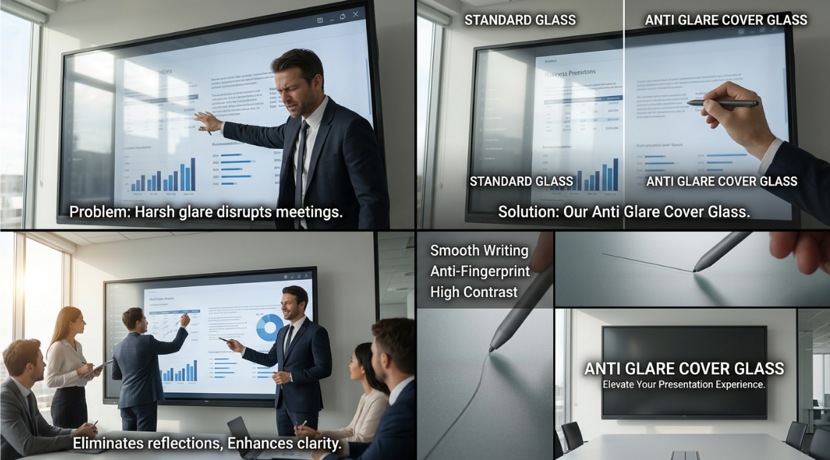
AG glass is specially treated to diffuse reflected light, minimizing glare from ambient lighting, windows, or overhead fixtures. For interactive whiteboards used in classrooms, boardrooms, and training centers, high-quality AG glass directly impacts:
l Visibility and Clarity: Crisp images and text even under bright conditions
l Touch Experience: Smooth, accurate multi-touch performance without interference
l Durability: Resistance to scratches, fingerprints, and chemical cleaners
l Eye Comfort: Reduced glare-related fatigue during long sessions
l Long-term Value: Better longevity and lower maintenance costs
Look for AG glass with a haze value between 4% and 12%. Too low and glare persists; too high and the image becomes hazy. For most interactive whiteboard applications, 6-8% haze offers the best balance between clarity and anti-reflective performance.
Premium AG glass should maintain light transmittance above 88-92%. High-quality optical coatings preserve color accuracy and brightness without washing out the display’s native performance.
Choose glass with a surface hardness of 6H or higher (Mohs scale). This ensures the board withstands daily use with styluses, fingers, and cleaning. Look for tempered or chemically strengthened glass for added safety and impact resistance.
Modern AG glass often includes oleophobic AF coatings that repel oils and smudges. This is especially important for high-traffic educational and corporate environments where frequent cleaning is necessary.
Standard thicknesses range from 3mm to 6mm. Thicker glass provides better structural integrity for larger whiteboards (75"–86"+). Superior flatness ensures uniform touch sensitivity across the entire surface.
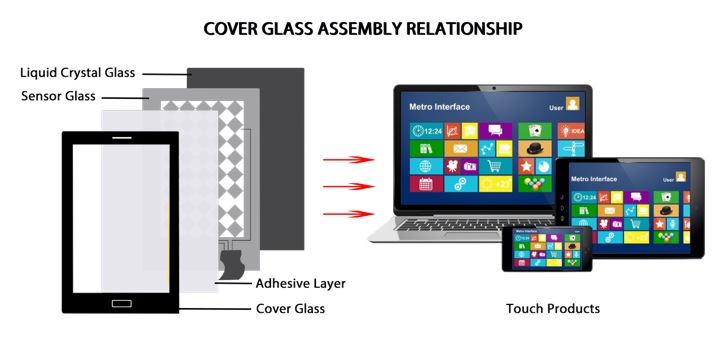
Ensure the AG glass is optimized for your specific panel type (LCD, LED, or emerging Mini-LED). It should integrate seamlessly with IR, capacitive, or electromagnetic touch overlays.
1.Selecting the cheapest option without performance data
2.Ignoring room lighting conditions during evaluation
3.Overlooking long-term maintenance and cleaning compatibility
4.Choosing non-tempered glass for safety-critical installations (schools, hospitals)
AG stands for anti-glare. It’s a surface treatment — usually chemical etching — that reduces reflected light on interactive whiteboard screens.
For most collaborative touchscreens, AG glass (anti-glare) is preferred because it manages direct reflections under bright lights. AR (anti-reflective) coatings reduce overall reflectance but can show fingerprints more and are often pricier. Many premium boards now use an AG + AR hybrid.
High-quality AG glass with controlled surface roughness (Ra < 0.15 µm) has no noticeable impact on capacitive touch accuracy. Excessively rough surfaces can slightly reduce linearity in some IR touch frames.
It depends on the model. Optical bonding often makes glass replacement impractical. For modular designs, replacement is possible and a growing aftermarket service opportunity.
At Fuxin Glass, we specialize in premium AG glass solutions engineered specifically for interactive displays. Our products deliver industry-leading optical performance, durability, and value. Contact our sales team for personalized recommendations, samples, or a custom quotation tailored to your project needs.

Copyright © 2026 Fuxin Glass (Dongguan City) Technology Co., Ltd. All Rights Reserved